T
TextSearchUI

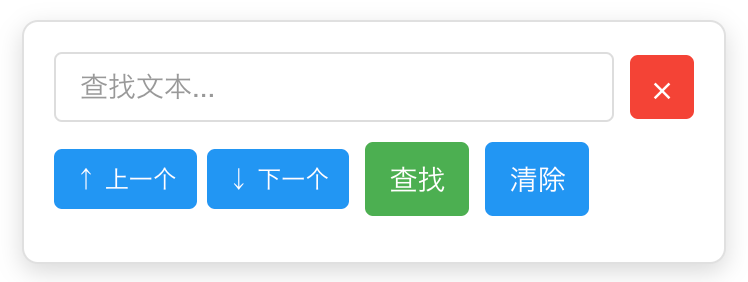
TextSearchUI 是一个轻量级的网页文本搜索工具,提供类似浏览器原生搜索的功能,支持快捷键、高亮显示和导航功能。
#搜索增强
#快捷键
#网页增强
資料統計
總安裝量
1K
近 24 小時
+2
使用者評分
-
廣告
描述
版本3
評分0
權限說明
一个轻量级的网页文本搜索工具,支持高亮和快捷键。
載入中…
一个功能完整的网页文本搜索组件,支持高亮显示、拖拽定位、主题切换等特性。
Ctrl+F / Cmd+F 快速唤起// 创建搜索实例(使用默认配置)
const search = new TextSearchUI();
// 指定搜索范围(默认整个网页)
const search = new TextSearchUI({ scope: '#content' });
// 浅色主题
const search = new TextSearchUI({ theme: 'light' });

// 深色主题
const search = new TextSearchUI({ theme: 'dark' });

// 自动主题(跟随系统)
const search = new TextSearchUI({ theme: 'auto' });
new TextSearchUI(options)
| 参数 | 类型 | 默认值 | 说明 |
|---|---|---|---|
options.theme |
'light' | 'dark' | 'auto' |
'auto' |
初始主题模式 |
options.beforeShow |
callback |
null |
在 对话框显示前被回调 |
show()显示搜索框并自动聚焦输入框。
search.show();
hide()隐藏搜索框并清除所有高亮。
search.hide();
search(searchTerm)执行搜索并高亮所有匹配项。
search.search('关键词');
参数:
searchTerm (string): 要搜索的文本findNext()跳转到下一个匹配项。
search.findNext();
findPrevious()跳转到上一个匹配项。
search.findPrevious();
clear()清除所有高亮和搜索结果。
search.clear();
setScope动态修改搜索范围。
search.setScope('.article');

// 或
search.setScope(document.querySelector('.article'));
setTheme(theme)动态切换主题。
// 切换到深色模式
search.setTheme('dark');

// 切换到浅色模式
search.setTheme('light');

// 切换到自动模式
search.setTheme('auto');
参数:
theme ('light' | 'dark' | 'auto'): 新主题模式| 快捷键 | 功能 |
|---|---|
Ctrl+F / Cmd+F |
打开搜索框 |
Enter |
执行搜索 / 跳转到下一个 |
Shift+Enter |
跳转到上一个 |
Esc |
关闭搜索框 |
<!DOCTYPE html>
<html lang="zh-CN">
<head>
    <meta charset="UTF-8">
    <title>文本搜索示例</title>
</head>
<body>
    <h1>页面标题</h1>
    <p>这是一段可以被搜索的文本内容...</p>

    <script src="TextSearchUI.js"></script>
    <script>
        // 初始化搜索功能
        const search = new TextSearchUI();
    </script>
</body>
</html>
<!DOCTYPE html>
<html lang="zh-CN">
<head>
    <meta charset="UTF-8">
    <title>主题切换示例</title>
</head>
<body>
    <button id="theme-light">浅色</button>
    <button id="theme-dark">深色</button>
    <button id="theme-auto">自动</button>

    <div class="content">
        <p>大量文本内容...</p>
    </div>

    <script src="TextSearchUI.js"></script>
    <script>
        // 初始化搜索(默认自动主题)
        const search = new TextSearchUI({ theme: 'auto' });

        // 主题切换按钮
        document.getElementById('theme-light').onclick = () => {
            search.setTheme('light');
        };

        document.getElementById('theme-dark').onclick = () => {
            search.setTheme('dark');
        };

        document.getElementById('theme-auto').onclick = () => {
            search.setTheme('auto');
        };
    </script>
</body>
</html>
// 创建实例
const search = new TextSearchUI({ theme: 'light' });

// 程序化打开并搜索
search.show();
search.search('JavaScript');

// 导航匹配项
setTimeout(() => search.findNext(), 1000);
setTimeout(() => search.findPrevious(), 2000);

// 3秒后清除并关闭
setTimeout(() => {
    search.clear();
    search.hide();
}, 3000);
// 监听页面主题变化并同步
const themeObserver = new MutationObserver((mutations) => {
    mutations.forEach((mutation) => {
        if (mutation.attributeName === 'data-theme') {
            const pageTheme = document.body.dataset.theme;
            search.setTheme(pageTheme);
        }
    });
});

const search = new TextSearchUI();

// 监听body的data-theme属性
themeObserver.observe(document.body, {
    attributes: true,
    attributeFilter: ['data-theme']
});
light - 浅色主题 dark - 深色主题 auto - 自动主题 prefers-color-scheme 自动切换组件使用 CSS 变量实现主题,可以通过覆盖变量自定义样式:
/* 自定义浅色主题颜色 */
:root {
    --search-highlight-bg: #your-color;
    --search-highlight-current-bg: #your-color;
}

/* 自定义深色主题颜色 */
body[data-search-theme="dark"] {
    --search-highlight-bg: #your-color;
    --search-highlight-current-bg: #your-color;
}
.text-search-container {
    top: 100px !important;
    left: 20px !important;
    right: auto !important;
}
/* 普通高亮 */
mark.search-highlight {
    background-color: lime !important;
    color: black !important;
}

/* 当前高亮 */
mark.search-highlight.current {
    background-color: orange !important;
    color: white !important;
}
.text-search-container {
    min-width: 400px !important;
    padding: 20px !important;
}
body 上添加 data-search-theme 属性,请避免冲突A: 修改 bindEvents() 方法,移除 input 事件监听器,只保留 Enter 键和按钮搜索。
A: 修改 addKeyboardShortcut() 方法中的按键判断逻辑:
if ((e.ctrlKey || e.metaKey) && e.key === 'k') { // 改为 Ctrl+K
    e.preventDefault();
    this.show();
}
A: 在 highlightText() 方法的 acceptNode 中添加过滤规则:
if (node.parentElement.closest('script, style, .text-search-container, .no-search')) {
    return NodeFilter.FILTER_REJECT;
}
然后给不想被搜索的元素添加 .no-search 类。
MIT License