YouTube A/B Loop
A lightweight userscript that adds a native A/B loop panel directly into the YouTube player — no extension, no bloat. Works with ScriptCat, Tampermonkey, and any compatible userscript manager.
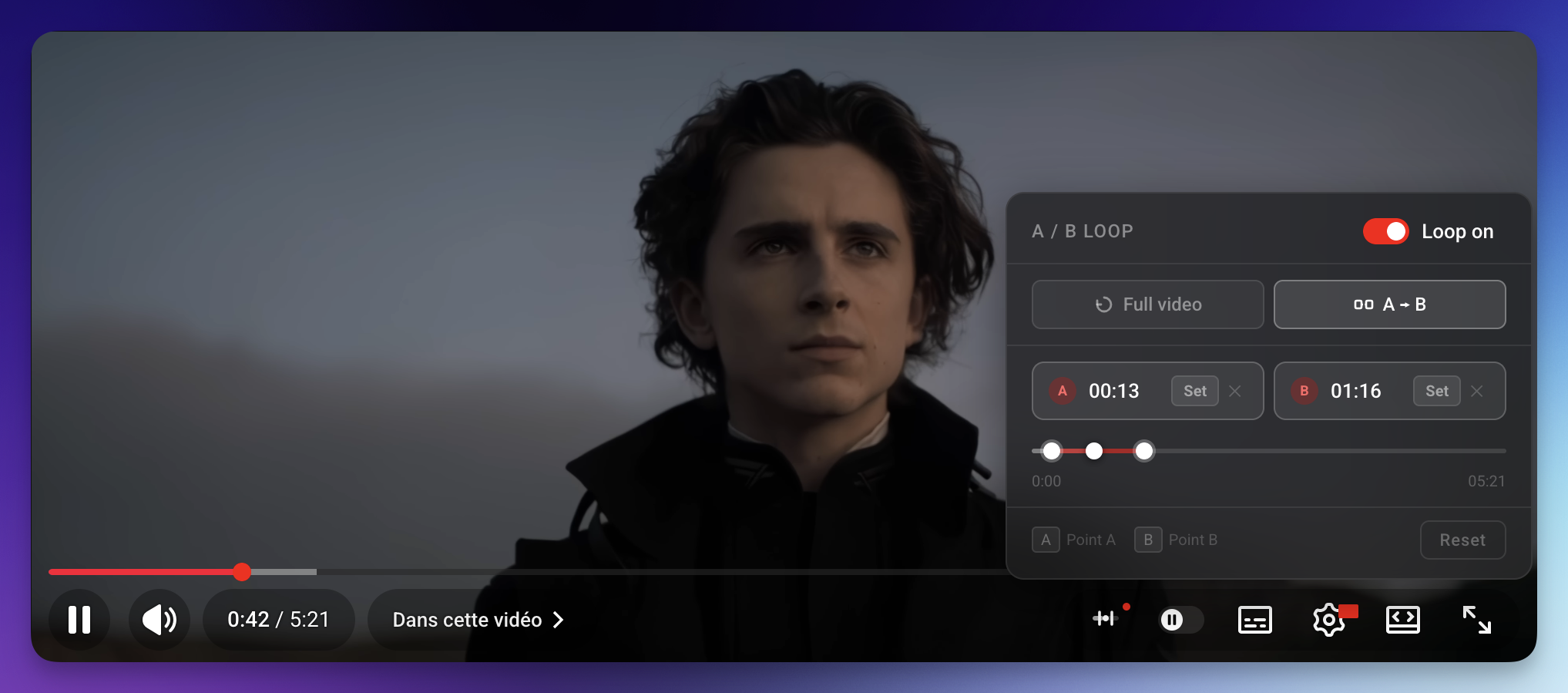
Features
- A → B loop — set two timestamps and loop between them indefinitely
- Full video loop — restart the entire video automatically on end
- Manual time entry — click a point's time to type an exact timestamp (strict
m:ss / h:mm:ss), clamped to the video length
- Mini timeline — draggable thumbs for A, B and the playhead, with a highlighted range overlay
- Keyboard shortcuts — press
A or B to set points at the current time
- Auto-update banner — the panel shows a notification when a newer version is available on GitHub
- Native look — glass-morphism panel that matches YouTube's own UI style
- Zero performance waste — RAF-based render loop with per-frame value caching; only writes to the DOM when something actually changes
Screenshots
| Panel — A/B mode |
Panel — Full video mode |
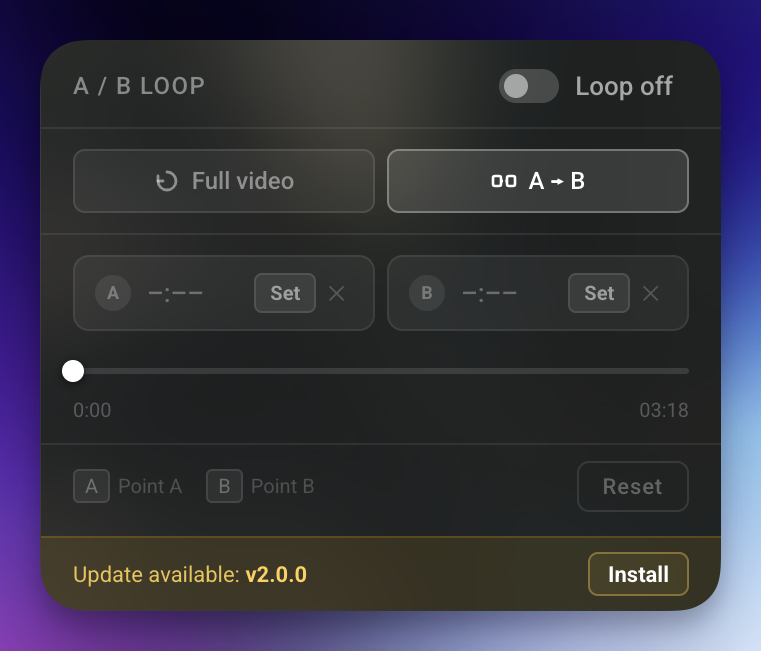 |
!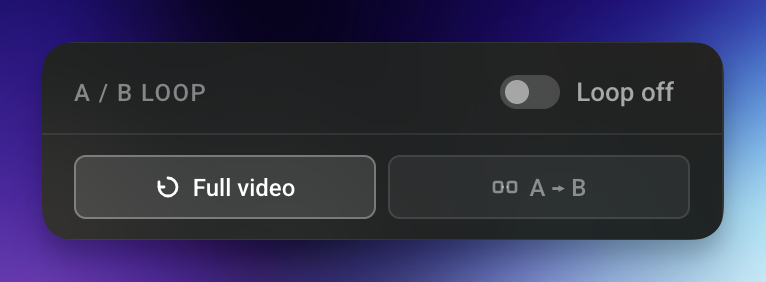 |
Installation
Requirements
A userscript manager installed in your browser. Recommended options:
One-click install
Click the link below — your userscript manager will open an install prompt automatically:
→ Install YouTube A/B Loop
Manual install
- Open ScriptCat (or Tampermonkey) → Create a new script
- Paste the contents of
youtube-loop.js
- Save (
Ctrl+S)
Usage
| Action |
How |
| Open the panel |
Click the ⊞ button in YouTube's right toolbar |
| Set point A |
Click Set on the A card, or press A |
| Set point B |
Click Set on the B card, or press B |
| Edit a timestamp |
Click the time on the A/B card → type m:ss or h:mm:ss, Enter to confirm, Esc to cancel |
| Clear a point |
Click ✕ next to the point |
| Enable loop |
Toggle the Loop off / Loop on pill switch |
| Switch mode |
Click Full video or A → B |
| Reset everything |
Click Reset |
| Seek |
Click anywhere on the mini-timeline, or drag any thumb |
Tip: You can set A and B while the video is playing — the loop activates immediately. You can also click a point's time and type an exact value (even on an unset point), so there's no need to seek to the position first.
Auto-update
ScriptCat and Tampermonkey both check for updates automatically (once per day by default) using the @updateURL and @downloadURL directives in the script header.
When a new version is published on GitHub, a yellow "Update available" banner also appears at the bottom of the panel with a direct Install link.
To bump the version yourself, update both:
@version in the userscript headerVERSION constant in the code
How it works
tryInject()  →  inject()
                  ├── builds CSS + DOM (Trusted-Types-safe, pure DOM APIs)
                  ├── wireMode()      — Full video / A → B selector
                  ├── wirePanel()     — open/close the panel
                  ├── wireToggle()    — loop on/off pill
                  ├── wirePoints()    — Set / Clear / Reset buttons
                  ├── wireTimeline()  — draggable A, B and playhead thumbs
                  ├── wireTimeEdit()  — click a time to type it manually
                  ├── wireKeyboard()  — A / B shortcuts
                  ├── frame()         — RAF loop, enforces A/B boundary
                  └── wireUpdate()    — async GitHub version fetch
Navigation between YouTube videos is detected by three independent layers, all funnelled
into a debounced onNav(): the native yt-navigate-finish event, a setInterval URL poll
(reliable in any execution context), and a MutationObserver on <title> as a lightweight
fallback. On each navigation teardown() runs — it aborts the session's AbortController
(removing all global listeners) and cancels the RAF — then a fresh isolated session object
is built, so there's no stale state or listener leak between videos.
Development
# Clone
git clone https://github.com/Black0S/Youtube-Loop-UserScript-.git

# Edit
# youtube-loop.js is a single self-contained file — no build step required.

# Test
# Install locally via ScriptCat or Tampermonkey, open any YouTube video.
When releasing a new version:
- Bump
@version in the header (e.g. 1.0.0 → 1.1.0)
- Bump
CURRENT_VERSION constant to match
- Push to
main — ScriptCat, Tampermonkey, and the in-panel banner will all pick it up automatically
Changelog
v3.0.0
- New — Manual time entry: click a point's time to edit it in place. Strict
m:ss / h:mm:ss parsing, value clamped to [0, duration]; Enter/blur confirms, Esc or an invalid value cancels, an empty value clears the point.
- Fix — Listener leak: every global (
document/window) listener now registers against a per-session AbortController, so teardown() removes them on SPA navigation. Previously they accumulated on every video change.
- Fix — Update check:
semverGt now compares correctly for 2-segment versions (e.g. 2.0 vs 2.0.0).
- Perf: the mini-timeline only redraws while the panel is open; loop enforcement keeps running either way.
- Cleanup: removed dead code and de-duplicated point logic into a shared
applyPoint() used by Set, drag and manual edit.
License
MIT © Black0S

