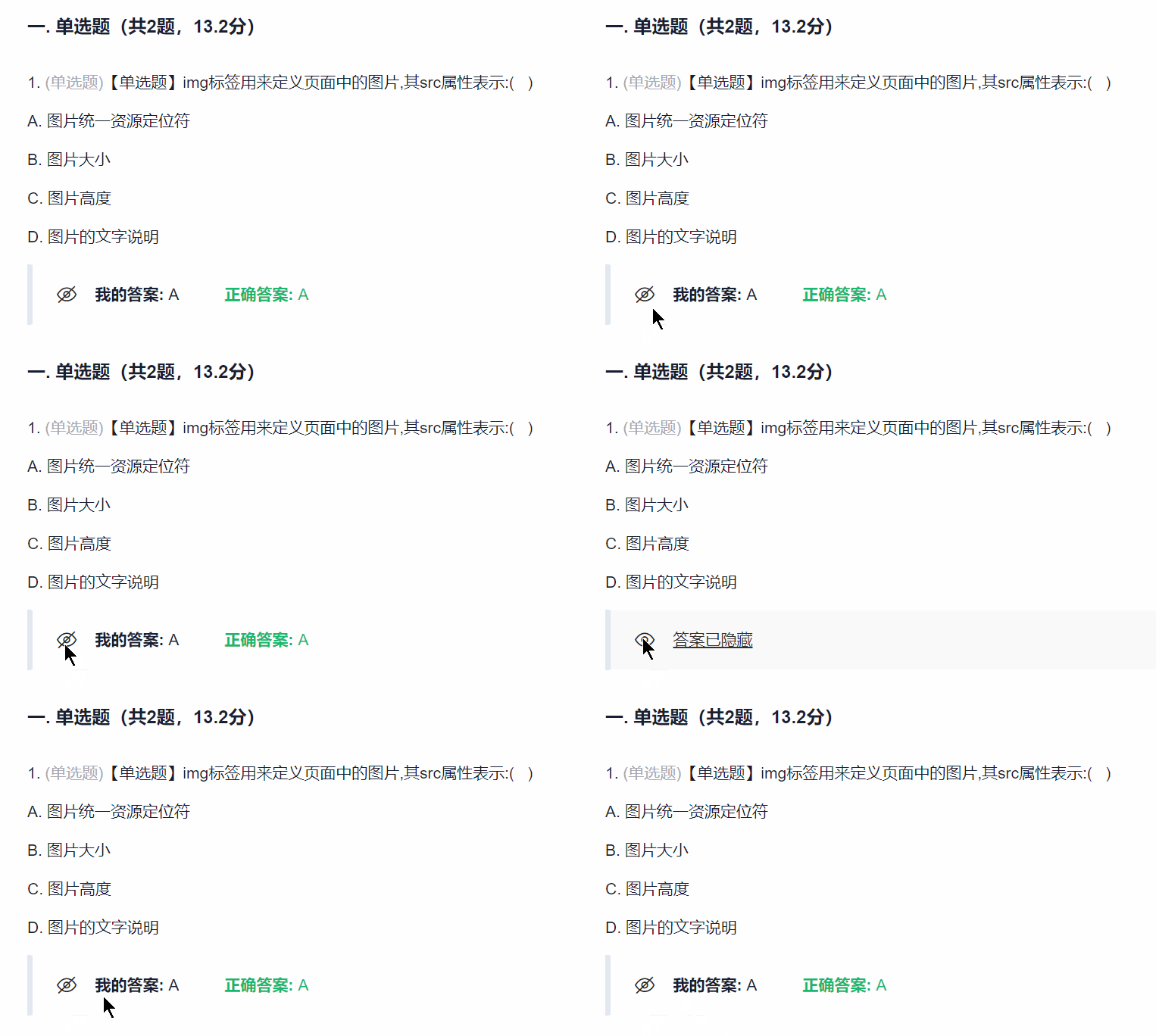
超星隐藏显示正确答案

Created 2023-12-31
Updated 2023-12-31
通过单击键盘左上方的~/`/·键来隐藏/显示正确答案,用于期末复习
#超星学习通
#学习辅助
#答案显示
#快捷键
Statistics
Total Installs
1.2K
Last 24h
+0
User Rating
-
通过按 ` 键隐藏/显示超星学习通作业答案,辅助期末自测复习。
<html lang="en"

data-color-mode="auto" data-light-theme="light" data-dark-theme="dark" data-a11y-animated-images="system" data-a11y-link-underlines="true"

<link crossorigin="anonymous" media="all" rel="stylesheet" href="https://github.githubassets.com/assets/primer-primitives-ac2f4b33720c6312.css" />
<link crossorigin="anonymous" media="all" rel="stylesheet" href="https://github.githubassets.com/assets/primer-bb3e7caff8347285.css" />
<link crossorigin="anonymous" media="all" rel="stylesheet" href="https://github.githubassets.com/assets/global-1832d803adebd2b4.css" />
<link crossorigin="anonymous" media="all" rel="stylesheet" href="https://github.githubassets.com/assets/github-cf976967feea1e66.css" />
HideShowChaoXingAnswer/README.MD at main · LeonYew-Ley/HideShowChaoXingAnswer · GitHub
<meta name="hovercard-subject-tag" content="repository:737480106" data-turbo-transient>
<meta name="google-site-verification" content="Apib7-x98H0j5cPqHWwSMm6dNU4GmODRoqxLiDzdx9I">
<meta name="user-login" content="">


<meta name="viewport" content="width=device-width">


  <meta name="description" content="学习通复习显示隐藏答案 HideShowChaoXingAnwer. Contribute to LeonYew-Ley/HideShowChaoXingAnswer development by creating an account on GitHub.">

  <link rel="search" type="application/opensearchdescription+xml" href="/opensearch.xml" title="GitHub">

<link rel="fluid-icon" href="https://github.com/fluidicon.png" title="GitHub">
<meta property="fb:app_id" content="1401488693436528">
<meta name="apple-itunes-app" content="app-id=1477376905, app-argument=https://github.com/LeonYew-Ley/HideShowChaoXingAnswer/blob/main/README.MD" />

  <meta name="twitter:image" content="https://opengraph.githubassets.com/df967c743ef256caf5e677c3b4fc71a4dac921e07cd5ffaa71e4c311891e42b4/LeonYew-Ley/HideShowChaoXingAnswer" /><meta name="twitter:site" content="@github" /><meta name="twitter:card" content="summary_large_image" /><meta name="twitter:title" content="HideShowChaoXingAnswer/README.MD at main · LeonYew-Ley/HideShowChaoXingAnswer" /><meta name="twitter:description" content="学习通复习显示隐藏答案 HideShowChaoXingAnwer. Contribute to LeonYew-Ley/HideShowChaoXingAnswer development by creating an account on GitHub." />
  <meta name="hostname" content="github.com">


    <meta name="expected-hostname" content="github.com">
  <meta name="turbo-cache-control" content="no-cache" data-turbo-transient>

<meta data-hydrostats="publish">
<meta name="turbo-body-classes" content="logged-out env-production page-responsive">
<meta name="release" content="309153364422b3c499922d1a2a6404910a58ed8e" data-turbo-track="reload">
<div class="position-relative header-wrapper js-header-wrapper ">
  <a href="#start-of-content" data-skip-target-assigned="false" class="px-2 tmp-py-4 color-bg-accent-emphasis color-fg-on-emphasis show-on-focus js-skip-to-content">Skip to content</a>

  <span data-view-component="true" class="progress-pjax-loader Progress position-fixed width-full">
<span style="width: 0%;" data-view-component="true" class="Progress-item progress-pjax-loader-bar left-0 top-0 color-bg-accent-emphasis"></span>

<react-partial partial-name="keyboard-shortcuts-dialog" data-ssr="false" data-attempted-ssr="false" data-react-profiling="false"

Navigation Menu

Toggle navigation
  <a class="tmp-mr-lg-3 color-fg-inherit flex-order-2 js-prevent-focus-on-mobile-nav"
    href="/"
    aria-label="Homepage"
    data-analytics-event="{&quot;category&quot;:&quot;Marketing nav&quot;,&quot;action&quot;:&quot;click to go to homepage&quot;,&quot;label&quot;:&quot;ref_page:Marketing;ref_cta:Logomark;ref_loc:Header&quot;}">
    <svg height="32" aria-hidden="true" data-component="Octicon" viewBox="0 0 24 24" version="1.1" width="32" data-view-component="true" class="octicon octicon-mark-github">
<path d="M10.226 17.284c-2.965-.36-5.054-2.493-5.054-5.256 0-1.123.404-2.336 1.078-3.144-.292-.741-.247-2.314.09-2.965.898-.112 2.111.36 2.83 1.01.853-.269 1.752-.404 2.853-.404 1.1 0 1.999.135 2.807.382.696-.629 1.932-1.1 2.83-.988.315.606.36 2.179.067 2.942.72.854 1.101 2 1.101 3.167 0 2.763-2.089 4.852-5.098 5.234.763.494 1.28 1.572 1.28 2.807v2.336c0 .674.561 1.056 1.235.786 4.066-1.55 7.255-5.615 7.255-10.646C23.5 6.188 18.334 1 11.978 1 5.62 1 .5 6.188.5 12.545c0 4.986 3.167 9.12 7.435 10.669.606.225 1.19-.18 1.19-.786V20.63a2.9 2.9 0 0 1-1.078.224c-1.483 0-2.359-.808-2.987-2.313-.247-.607-.517-.966-1.034-1.033-.27-.023-.359-.135-.359-.27 0-.27.45-.471.898-.471.652 0 1.213.404 1.797 1.235.45.651.921.943 1.483.943.561 0 .92-.202 1.437-.719.382-.381.674-.718.944-.943"></path>
  <div class="d-flex flex-1 flex-order-2 text-right d-lg-none gap-2 flex-justify-end">
      <a
        href="/login?return_to=https%3A%2F%2Fgithub.com%2FLeonYew-Ley%2FHideShowChaoXingAnswer%2Fblob%2Fmain%2FREADME.MD"
        class="HeaderMenu-link HeaderMenu-button d-inline-flex f5 no-underline border color-border-default rounded-2 px-2 py-1 color-fg-inherit js-prevent-focus-on-mobile-nav"
        data-hydro-click="{&quot;event_type&quot;:&quot;authentication.click&quot;,&quot;payload&quot;:{&quot;location_in_page&quot;:&quot;site header menu&quot;,&quot;repository_id&quot;:null,&quot;auth_type&quot;:&quot;SIGN_UP&quot;,&quot;originating_url&quot;:&quot;https://github.com/LeonYew-Ley/HideShowChaoXingAnswer/blob/main/README.MD&quot;,&quot;user_id&quot;:null}}" data-hydro-click-hmac="30cc58c7626622ae9941e677fecc860cbae5db846f8ff544417fedd23a28ade9"
        data-analytics-event="{&quot;category&quot;:&quot;Marketing nav&quot;,&quot;action&quot;:&quot;click to Sign in&quot;,&quot;label&quot;:&quot;ref_page:Marketing;ref_cta:Sign in;ref_loc:Header&quot;}"
      >
        Sign in
      </a>
          <div class="AppHeader-appearanceSettings">
<react-partial-anchor>        <button data-target="react-partial-anchor.anchor" id="icon-button-06a4a519-facd-48dc-aa75-163f2dacb28e" aria-labelledby="tooltip-c5e8c58c-789f-4ae9-8d86-bcd0e1906277" type="button" disabled="disabled" data-view-component="true" class="Button Button--iconOnly Button--invisible Button--medium AppHeader-button HeaderMenu-link border cursor-wait">  <svg aria-hidden="true" data-component="Octicon" height="16" viewBox="0 0 16 16" version="1.1" width="16" data-view-component="true" class="octicon octicon-sliders Button-visual">
<path d="M15 2.75a.75.75 0 0 1-.75.75h-4a.75.75 0 0 1 0-1.5h4a.75.75 0 0 1 .75.75Zm-8.5.75v1.25a.75.75 0 0 0 1.5 0v-4a.75.75 0 0 0-1.5 0V2H1.75a.75.75 0 0 0 0 1.5H6.5Zm1.25 5.25a.75.75 0 0 0 0-1.5h-6a.75.75 0 0 0 0 1.5h6ZM15 8a.75.75 0 0 1-.75.75H11.5V10a.75.75 0 1 1-1.5 0V6a.75.75 0 0 1 1.5 0v1.25h2.75A.75.75 0 0 1 15 8Zm-9 5.25v-2a.75.75 0 0 0-1.5 0v1.25H1.75a.75.75 0 0 0 0 1.5H4.5v1.25a.75.75 0 0 0 1.5 0v-2Zm9 0a.75.75 0 0 1-.75.75h-6a.75.75 0 0 1 0-1.5h6a.75.75 0 0 1 .75.75Z"></path>
Appearance settings

<react-partial partial-name="appearance-settings" data-ssr="false" data-attempted-ssr="false" data-react-profiling="false"

  </div>
</div>


<div class="HeaderMenu js-header-menu height-fit position-lg-relative d-lg-flex flex-column flex-auto top-0">
  <div class="HeaderMenu-wrapper d-flex flex-column flex-self-start flex-lg-row flex-auto rounded rounded-lg-0">
      <link crossorigin="anonymous" rel="modulepreload" href="https://github.githubassets.com/assets/71236-18053476e03a7169.js" fetchpriority="low" />

<react-partial partial-name="marketing-navigation" data-ssr="true" data-attempted-ssr="true" data-react-profiling="false"

    <div class="d-flex flex-column flex-lg-row width-full flex-justify-end flex-lg-items-center text-center tmp-mt-3 tmp-mt-lg-0 text-lg-left tmp-ml-lg-3">
            
Search or jump to...
<input type="hidden" name="type" class="js-site-search-type-field">

Search code, repositories, users, issues, pull requests...

      <div data-view-component="true">        <div class="search-suggestions position-fixed width-full color-shadow-large border color-fg-default color-bg-default overflow-hidden d-flex flex-column query-builder-container"
      style="border-radius: 12px;"
      data-target="qbsearch-input.queryBuilderContainer"
      hidden
    >
      <!-- '"` --><!-- </textarea></xmp> --></option></form><form id="query-builder-test-form" action="" accept-charset="UTF-8" method="get">
Search
Clear
      </span>
  </div>
  <template id="search-icon">
    <div class="position-relative">
                    <ul
          role="listbox"
          class="ActionListWrap QueryBuilder-ListWrap"
          aria-label="Suggestions"
          data-action="
            combobox-commit:query-builder#comboboxCommit
            mousedown:query-builder#resultsMousedown
          "
          data-target="query-builder.resultsList"
          data-persist-list=false
          id="query-builder-test-results"
          tabindex="-1"
        ></ul>

    </div>
  <div class="FormControl-inlineValidation" id="validation-d1bc7a06-fadd-4c20-99da-72dd1366b2ee" hidden="hidden">
    <span class="FormControl-inlineValidation--visual">
      <svg aria-hidden="true" data-component="Octicon" height="12" viewBox="0 0 12 12" version="1.1" width="12" data-view-component="true" class="octicon octicon-alert-fill">
<path d="M4.855.708c.5-.896 1.79-.896 2.29 0l4.675 8.351a1.312 1.312 0 0 1-1.146 1.954H1.33A1.313 1.313 0 0 1 .183 9.058ZM7 7V3H5v4Zm-1 3a1 1 0 1 0 0-2 1 1 0 0 0 0 2Z"></path>
</div>

Provide feedback

</div>
<div class="Overlay-actionWrap">
  <button data-close-dialog-id="feedback-dialog" aria-label="Close" aria-label="Close" type="button" data-view-component="true" class="close-button Overlay-closeButton"><svg aria-hidden="true" data-component="Octicon" height="16" viewBox="0 0 16 16" version="1.1" width="16" data-view-component="true" class="octicon octicon-x">
<path d="M3.72 3.72a.75.75 0 0 1 1.06 0L8 6.94l3.22-3.22a.749.749 0 0 1 1.275.326.749.749 0 0 1-.215.734L9.06 8l3.22 3.22a.749.749 0 0 1-.326 1.275.749.749 0 0 1-.734-.215L8 9.06l-3.22 3.22a.751.751 0 0 1-1.042-.018.751.751 0 0 1-.018-1.042L6.94 8 3.72 4.78a.75.75 0 0 1 0-1.06Z"></path>

We read every piece of feedback, and take your input very seriously.

Include my email address so I can be contacted
Cancel Submit feedback
<custom-scopes data-target="qbsearch-input.customScopesManager">

Saved searches

Use saved searches to filter your results more quickly

    <div hidden class="create-custom-scope-form" data-target="custom-scopes.createCustomScopeForm">
    <!-- '"` --><!-- </textarea></xmp> --></option></form><form id="custom-scopes-dialog-form" data-turbo="false" action="/search/custom_scopes" accept-charset="UTF-8" method="post"><input type="hidden" name="authenticity_token" value="AY5zc0liFMgQFFvDk-OsbCRpX-DKIvRN6UF15Mehgm9alCixdzI985eF_a4RdjDJYtHWg0Kdmb9Rh0nk-7qDjA" />
      <div data-target="custom-scopes.customScopesModalDialogFlash"></div>

      <input type="hidden" id="custom_scope_id" name="custom_scope_id" data-target="custom-scopes.customScopesIdField">

      <div class="form-group">
        <label for="custom_scope_name">Name</label>
        <auto-check src="/search/custom_scopes/check_name" required>
          <input
            type="text"
            name="custom_scope_name"
            id="custom_scope_name"
            data-target="custom-scopes.customScopesNameField"
            class="form-control"
            autocomplete="off"
            placeholder="github-ruby"
            required
            maxlength="50">
          <input type="hidden" value="vx8kHFxTsheMPJYwbh0Wo3cX0NoyH9fJE57NjtW63gh3IxHMpSQgzGTn2KdhJXsQeiuIasPoyls-aARw-YUFPw" data-csrf="true" />
        </auto-check>
      </div>

      <div class="form-group">
        <label for="custom_scope_query">Query</label>
        <input
          type="text"
          name="custom_scope_query"
          id="custom_scope_query"
          data-target="custom-scopes.customScopesQueryField"
          class="form-control"
          autocomplete="off"
          placeholder="(repo:mona/a OR repo:mona/b) AND lang:python"
          required
          maxlength="500">
      </div>

      <p class="text-small color-fg-muted">
        To see all available qualifiers, see our <a class="Link--inTextBlock" href="https://docs.github.com/search-github/github-code-search/understanding-github-code-search-syntax">documentation</a>.
      </p>
    <div data-target="custom-scopes.manageCustomScopesForm">
      <div data-target="custom-scopes.list"></div>
    </div>
Cancel Create saved search
        <div class="position-relative HeaderMenu-link-wrap d-lg-inline-block">
          <a
            href="/login?return_to=https%3A%2F%2Fgithub.com%2FLeonYew-Ley%2FHideShowChaoXingAnswer%2Fblob%2Fmain%2FREADME.MD"
            class="HeaderMenu-link HeaderMenu-link--sign-in HeaderMenu-button flex-shrink-0 no-underline d-none d-lg-inline-flex border border-lg-0 rounded px-2 py-1"
            style="margin-left: 12px;"
            data-hydro-click="{&quot;event_type&quot;:&quot;authentication.click&quot;,&quot;payload&quot;:{&quot;location_in_page&quot;:&quot;site header menu&quot;,&quot;repository_id&quot;:null,&quot;auth_type&quot;:&quot;SIGN_UP&quot;,&quot;originating_url&quot;:&quot;https://github.com/LeonYew-Ley/HideShowChaoXingAnswer/blob/main/README.MD&quot;,&quot;user_id&quot;:null}}" data-hydro-click-hmac="30cc58c7626622ae9941e677fecc860cbae5db846f8ff544417fedd23a28ade9"
            data-analytics-event="{&quot;category&quot;:&quot;Marketing nav&quot;,&quot;action&quot;:&quot;click to go to homepage&quot;,&quot;label&quot;:&quot;ref_page:Marketing;ref_cta:Sign in;ref_loc:Header&quot;}"
          >
            Sign in
          </a>
        </div>

          <a href="/signup?ref_cta=Sign+up&amp;ref_loc=header+logged+out&amp;ref_page=%2F%3Cuser-name%3E%2F%3Crepo-name%3E%2Fblob%2Fshow&amp;source=header-repo&amp;source_repo=LeonYew-Ley%2FHideShowChaoXingAnswer"
            class="HeaderMenu-link HeaderMenu-link--sign-up HeaderMenu-button flex-shrink-0 d-flex d-lg-inline-flex no-underline border color-border-default rounded px-2 py-1"
            data-hydro-click="{&quot;event_type&quot;:&quot;authentication.click&quot;,&quot;payload&quot;:{&quot;location_in_page&quot;:&quot;site header menu&quot;,&quot;repository_id&quot;:null,&quot;auth_type&quot;:&quot;SIGN_UP&quot;,&quot;originating_url&quot;:&quot;https://github.com/LeonYew-Ley/HideShowChaoXingAnswer/blob/main/README.MD&quot;,&quot;user_id&quot;:null}}" data-hydro-click-hmac="30cc58c7626622ae9941e677fecc860cbae5db846f8ff544417fedd23a28ade9"
            data-analytics-event="{&quot;category&quot;:&quot;Sign up&quot;,&quot;action&quot;:&quot;click to sign up for account&quot;,&quot;label&quot;:&quot;ref_page:/&lt;user-name&gt;/&lt;repo-name&gt;/blob/show;ref_cta:Sign up;ref_loc:header logged out&quot;}"
          >
            Sign up
          </a>

            <div class="AppHeader-appearanceSettings">
<react-partial-anchor>        <button data-target="react-partial-anchor.anchor" id="icon-button-1a50c9ec-e4b8-4a2e-bced-a542715bfc7c" aria-labelledby="tooltip-0eb44dd6-2db1-42ab-8e8b-4fb6f1c46c1c" type="button" disabled="disabled" data-view-component="true" class="Button Button--iconOnly Button--invisible Button--medium AppHeader-button HeaderMenu-link border cursor-wait">  <svg aria-hidden="true" data-component="Octicon" height="16" viewBox="0 0 16 16" version="1.1" width="16" data-view-component="true" class="octicon octicon-sliders Button-visual">
<path d="M15 2.75a.75.75 0 0 1-.75.75h-4a.75.75 0 0 1 0-1.5h4a.75.75 0 0 1 .75.75Zm-8.5.75v1.25a.75.75 0 0 0 1.5 0v-4a.75.75 0 0 0-1.5 0V2H1.75a.75.75 0 0 0 0 1.5H6.5Zm1.25 5.25a.75.75 0 0 0 0-1.5h-6a.75.75 0 0 0 0 1.5h6ZM15 8a.75.75 0 0 1-.75.75H11.5V10a.75.75 0 1 1-1.5 0V6a.75.75 0 0 1 1.5 0v1.25h2.75A.75.75 0 0 1 15 8Zm-9 5.25v-2a.75.75 0 0 0-1.5 0v1.25H1.75a.75.75 0 0 0 0 1.5H4.5v1.25a.75.75 0 0 0 1.5 0v-2Zm9 0a.75.75 0 0 1-.75.75h-6a.75.75 0 0 1 0-1.5h6a.75.75 0 0 1 .75.75Z"></path>
Appearance settings

<react-partial partial-name="appearance-settings" data-ssr="false" data-attempted-ssr="false" data-react-profiling="false"

      <button type="button" class="sr-only js-header-menu-focus-trap d-block d-lg-none">Resetting focus</button>
    </div>
  </div>
</div>
  <div hidden="hidden" data-view-component="true" class="js-stale-session-flash stale-session-flash flash flash-warn flash-full">

    <svg aria-hidden="true" data-component="Octicon" height="16" viewBox="0 0 16 16" version="1.1" width="16" data-view-component="true" class="octicon octicon-alert">
<path d="M6.457 1.047c.659-1.234 2.427-1.234 3.086 0l6.082 11.378A1.75 1.75 0 0 1 14.082 15H1.918a1.75 1.75 0 0 1-1.543-2.575Zm1.763.707a.25.25 0 0 0-.44 0L1.698 13.132a.25.25 0 0 0 .22.368h12.164a.25.25 0 0 0 .22-.368Zm.53 3.996v2.5a.75.75 0 0 1-1.5 0v-2.5a.75.75 0 0 1 1.5 0ZM9 11a1 1 0 1 1-2 0 1 1 0 0 1 2 0Z"></path>
You signed in with another tab or window. Reload to refresh your session. You signed out in another tab or window. Reload to refresh your session. You switched accounts on another tab or window. Reload to refresh your session.
<button id="icon-button-c576a907-776c-49bb-90a0-6cf69db010f3" aria-labelledby="tooltip-e22b0743-4ad5-498d-91ae-a84945e2d6b2" type="button" data-view-component="true" class="Button Button--iconOnly Button--invisible Button--medium flash-close js-flash-close">  <svg aria-hidden="true" data-component="Octicon" height="16" viewBox="0 0 16 16" version="1.1" width="16" data-view-component="true" class="octicon octicon-x Button-visual">
<path d="M3.72 3.72a.75.75 0 0 1 1.06 0L8 6.94l3.22-3.22a.749.749 0 0 1 1.275.326.749.749 0 0 1-.215.734L9.06 8l3.22 3.22a.749.749 0 0 1-.326 1.275.749.749 0 0 1-.734-.215L8 9.06l-3.22 3.22a.751.751 0 0 1-1.042-.018.751.751 0 0 1-.018-1.042L6.94 8 3.72 4.78a.75.75 0 0 1 0-1.06Z"></path>
Dismiss alert
<div id="js-flash-container" class="flash-container" data-turbo-replace>
  <div>{{ message }}</div>

</div>
  <div class="d-flex flex-nowrap flex-justify-end tmp-mb-3  tmp-px-3 tmp-px-lg-5" style="gap: 1rem;">

    <div class="flex-auto min-width-0 width-fit">
        
<span class="author flex-self-stretch" itemprop="author">
  <a class="url fn" rel="author" data-hovercard-type="user" data-hovercard-url="/users/LeonYew-Ley/hovercard" data-octo-click="hovercard-link-click" data-octo-dimensions="link_type:self" href="/LeonYew-Ley">
    LeonYew-Ley

/ HideShowChaoXingAnswer

<span></span><span class="Label Label--secondary v-align-middle mr-1">Public</span>
    </div>

    <div id="repository-details-container" class="flex-shrink-0" data-turbo-replace style="max-width: 70%;">
        <ul class="pagehead-actions flex-shrink-0 d-none d-md-inline" style="padding: 2px 0;">

  
  • Notifications You must be signed in to change notification settings
  • Fork 0
  •     </div>
      </div>
    
        <div id="responsive-meta-container" data-turbo-replace>
    
          <nav data-pjax="#js-repo-pjax-container" aria-label="Repository" data-view-component="true" class="js-repo-nav js-sidenav-container-pjax js-responsive-underlinenav overflow-hidden UnderlineNav px-3 tmp-px-3 px-md-4 tmp-px-md-4 px-lg-5 tmp-px-lg-5">
    
    Additional navigation options
      <div data-view-component="true" class="Overlay-body Overlay-body--paddingNone">          <action-list>
    

    <react-app app-name="code-view" initial-path="/LeonYew-Ley/HideShowChaoXingAnswer/blob/main/README.MD" style="display: block; min-height: calc(100vh - 64px);" data-attempted-ssr="true" data-ssr="true" data-lazy="false" data-alternate="false" data-data-router-enabled="true" data-react-profiling="false"

    Latest commit


    History

    History
    69 lines (56 loc) · 3.05 KB
    main

    README.MD

    Top

    File metadata and controls

    • Preview
    • Code
    • Blame
    69 lines (56 loc) · 3.05 KB

    学习通复习显示隐藏答案 HideShowChaoXingAnwer

    一、作用 | Effects

    隐藏/显示作业详情页的答案,用于自己期末做题测试复习效果。思考之后再看正确答案。

    效果演示

    二、使用方法 | How to use

    通过单击键盘左上方的 ~ 键来隐藏/显示正确答案,用于期末复习

    三、快速安装 | Getting Started

    0. 安装扩展

    脚本猫🐱(国内✔️) 篡改猴🐵(✅推荐)
    Edge商店(✔️) Edge商店(✔️)
    Chrome应用店(🪜) Chrome应用店(🪜)

    1. 安装脚本

    📦v1.2.6 【点我安装⬇️】(GreasyFork)

    📦v1.2.6 【点我安装⬇️】(脚本猫)

    四、开发计划 | Dev To-Do List

    未实现 📃

    计划开发 📆

    • 支持章节检测的题目
    • 支持任务页面的题目答案隐藏
    • 增加GUI界面-设置页面
    • 设置快捷键
    • 支持将答案导出到Anki、MarkJi中

    不准备开发 ✖️

    已实现 ✅

    • “课程-作业”中的作业已支持隐藏答案复习
    • 通过点击按钮可显示隐藏答案

    五、更新 | Updates

    Version: 1.2.6

    1. 修改了README使其更人性化
    2. 修改了js文件的@version,去掉了版本号前的“v”,避免安装脚本时出现“vv1.x.x”

    Version: 1.2.5

    1. 修复了填空题不支持隐藏的BUG
    2. 修复了GreasyFork上看不到README的GIF效果图的BUG
    3. 引发了新的“特性”:填空题的div隐藏后不会保持原来的答题框大小,会造成题目位移。

    Version: 1.2.4

    1. 修改了README.MD的效果图片
    2. 修改了js脚本中的版本号
    3. 增加了js脚本中的项目地址

    Version: 1.2.0

    1. 增加了遮罩层用于显示答案状态
    2. 增加了通过图标点按显示隐藏答案
    3. 增加了“点击'答案已隐藏'之后显示答案”的功能,不再只通过按键恢复。
    4. 增加了“将分数和对错状态也一起隐藏”的功能
    5. 修复了用鼠标拖动可以查看反色文字的bug
    6. 修改了显示原理:修改文字div的display、添加遮罩层
    7. 修改了README中的效果图

    Version: 1.1.0

    1. 更新了显示原理为:修改字体颜色为transparent,以免元素隐藏之后引起页面其他元素的的上下位移。
    2. 更新了README中的效果图

    Version: 1.0.0

    1. 完成了基本功能,原理是显示、隐藏答案块
    2. 发布了Github、GreasyFork、ScriptCat平台
    3. 创建了README,添加了git效果图
    </main>
    
          <footer class="footer tmp-pt-7 tmp-pb-6 f6 color-fg-muted color-border-subtle p-responsive" role="contentinfo" >
    

    Footer

    © 2026 GitHub, Inc.
    <nav aria-label="Footer">
      <h3 class="sr-only" id="sr-footer-heading">Footer navigation</h3>
    
      <ul class="list-style-none d-flex flex-justify-center flex-wrap mb-2 mb-lg-0" aria-labelledby="sr-footer-heading">
    
    
          <li class="mx-2">
            <a data-analytics-event="{&quot;category&quot;:&quot;Footer&quot;,&quot;action&quot;:&quot;go to Terms&quot;,&quot;label&quot;:&quot;text:terms&quot;}" href="https://docs.github.com/site-policy/github-terms/github-terms-of-service" data-view-component="true" class="Link--secondary Link">Terms</a>
          </li>
    
          <li class="mx-2">
            <a data-analytics-event="{&quot;category&quot;:&quot;Footer&quot;,&quot;action&quot;:&quot;go to privacy&quot;,&quot;label&quot;:&quot;text:privacy&quot;}" href="https://docs.github.com/site-policy/privacy-policies/github-privacy-statement" data-view-component="true" class="Link--secondary Link">Privacy</a>
          </li>
    
          <li class="mx-2">
            <a data-analytics-event="{&quot;category&quot;:&quot;Footer&quot;,&quot;action&quot;:&quot;go to security&quot;,&quot;label&quot;:&quot;text:security&quot;}" href="https://github.com/security" data-view-component="true" class="Link--secondary Link">Security</a>
          </li>
    
          <li class="mx-2">
            <a data-analytics-event="{&quot;category&quot;:&quot;Footer&quot;,&quot;action&quot;:&quot;go to status&quot;,&quot;label&quot;:&quot;text:status&quot;}" href="https://www.githubstatus.com/" data-view-component="true" class="Link--secondary Link">Status</a>
          </li>
    
          <li class="mx-2">
            <a data-analytics-event="{&quot;category&quot;:&quot;Footer&quot;,&quot;action&quot;:&quot;go to community&quot;,&quot;label&quot;:&quot;text:community&quot;}" href="https://github.community/" data-view-component="true" class="Link--secondary Link">Community</a>
          </li>
    
          <li class="mx-2">
            <a data-analytics-event="{&quot;category&quot;:&quot;Footer&quot;,&quot;action&quot;:&quot;go to docs&quot;,&quot;label&quot;:&quot;text:docs&quot;}" href="https://docs.github.com/" data-view-component="true" class="Link--secondary Link">Docs</a>
          </li>
    
          <li class="mx-2">
            <a data-analytics-event="{&quot;category&quot;:&quot;Footer&quot;,&quot;action&quot;:&quot;go to contact&quot;,&quot;label&quot;:&quot;text:contact&quot;}" href="https://support.github.com?tags=dotcom-footer" data-view-component="true" class="Link--secondary Link">Contact</a>
          </li>
    
          <li class="mx-2" >
    
    Manage cookies
  • Do not share my personal information
  •   </ul>
    </nav>
    
    <ghcc-consent id="ghcc" class="position-fixed bottom-0 left-0" style="z-index: 999999"
      data-locale="en"
      data-initial-cookie-consent-allowed=""
      data-cookie-consent-required="false"
    ></ghcc-consent>
    
    You can’t perform that action at this time.
    <template id="site-details-dialog">
    
    <div class="Popover js-hovercard-content position-absolute" style="display: none; outline: none;">
    
    <template id="snippet-clipboard-copy-button">
    
    </div>
    <div id="js-global-screen-reader-notice" class="sr-only mt-n1" aria-live="polite" aria-atomic="true" ></div>
    <div id="js-global-screen-reader-notice-assertive" class="sr-only mt-n1" aria-live="assertive" aria-atomic="true"></div>
    
    Script Details
    Applicable Sites
    LicenseMIT